Upload Video Clips To Multiple Sites in One Shot!
The market share of YouTube Videos (at 64%) is more than all other online video sharing websites combined. No wonder that YouTube is the preferred destination for uploading video on the Internet as it offers the maximum eyeballs.
While it’s true that videos posted on YouTube can quickly get the much needed exposure but by limiting yourself just to YouTube, you are actually missing an opportunity to expose your videos to the non-YouTube crowd and that is no insignificant number.
Hey Spread!!!
At Hey!Spread You only have to upload the video once and HeySpread will automatically distribute the video clip to the rest of video sharing networks - Sevenload, YouTube, Facebook, MySpace, Google Videos, Yahoo Videos, DailyMotion, Blip.tv, Photobucket, Metacafe, Revver, Veoh, Vsocial, Vimeo and Putfile.
If your favourite video sharing network is not currently supported by HeySpread (such as FLURL), beg them to support it as soon as possible!
You don’t have to open an account with HeySpread, but you need to provide them the login credentials of your respective video sharing accounts. The video clip can be either uploaded from hard disk or a hyperlink of the video at any HeySpread supported networks.
Having says that, HeySpread could on the fly propagate all video clips from one network to another. As such, there is no need to download the video and upload again to HeySpread!
Tube Mogul!!!!
TubeMogul allows you to follow the trend of your online videos.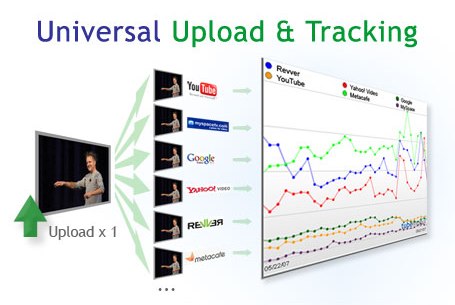 The cross-network tracking tools means that you can accumulate data from various sources for comparative purposes. There are six default networks available with TubeMogul, including YouTube, Revver, MetaCafe, MySpace, Yahoo and AOL. You can track individual videos or video publishers as well as other metrics like comments, average rating, and a list of top videos. You can create entire groups of content to track, and this works for both videos and publishers as well. This data is presented to you in charts that track online performance over time, and provides aggregated analytics for your research purposes. There is also the option of emailing your data or exporting it to Excel.
And it works just like Hey!Spread. You upload the video to TubeMogul, then enter the Title plus Description and finally pick video sites where you want to deploy your videos.
Let me know what you all think. Thank you.
3 Free Sites for Downloading Old Versions of your favorite Software!
Sometimes upgrading to a newer version can be a good thing. Other times, your computer may not be compatible with the new version, the new version is bloated, or all the options you liked are no longer available.
There could be many reasons where you like old version of a software and want to use it only! If you maintain your favorite softwares in their favorite versions thats fine but often you will find yourself browsing website of a software company for old versions of a particular software. Unfortunately not all software provider are interested in keeping old version available for downloads.
Here comes to rescue following 3 sites whose only purpose is to maintain old versions for free download. These three are almost identical in operation (in fact I had hard time to figure out differences to write about)
1. OldApps.com (Exclusively for Mac OS)
- Specifically mentions that software available for downloads are free from malware, trojan, and/or virus
- Dedicated section for Old Versions of Macintosh softwares.
- Nice Help section. Short and sweet!
- Softwares are not sorted but seems to maintain largest collection. Also noticed few Linux softwares.
- It maintains a drop-down menu in right sidebar through which you can really reach your favorite softwares version page with just one-click (and without typing too!)!
All 3 have a contribute section so that you can upload old versions of softwares you posses to their repository. Also OldApps and OldVersion have forums where you can discuss various issues related to software versions, etc!
Finally on personal note, few software I havent upgraded over a year includes…
- Winamp v2.73 - I love mplayer for movies. So why to go for winamp with video capability!

- ACDSee v3.0 - Image browsing application. Reason: New Versions are bulky and memory consuming.
Top Ten Online Video Converters
Have you ever wanted to convert online videos to your desired format without downloading any software ? These Top 10 Online Video Converters can help to convert videos from your favorite video websites to your desired format to Run on your PC, Mobile or an iPod. 1. Vixy.net - Online Free FLV Converter. It can convert YouTube videos to Popular Video formats like AVI, DivX, MOV, MPEG4, 3GP,MP4, MP3, iPod Video and PSP Video. Files are converted instantly and it shows the Ajax conversion progress bar. 2. ZamZar: Free Online file conversion service. It can convert your online videos to a number of video formats. The converted files are sent via email. 3. FLVix : FLVix can Convert videos from YouTube, Google Video or directly from .FLV file. Supported formats are AVI, MOV, 3GP, MP3, MP4. 5. Tubefish : Tubefish video converter can convert your videos instantly to MPEG, AVI, MOV, 3GP and Divx. 6. Movavi : Movavi is another online video converter. It notifies via email when converted files are ready to download. 7. VideoCodeZone - It can convert videos from Youtube, daily motion, break, metacafe. Supports various popular video formats. 8. Media Converter : Media Convert is an online media converter. It requires registration for converting videos from youtube. 9. Vconvert : Vconvert can Convert online flv and youtube videos to compatible formats for your iPod/iPhone, mobile phone. 10. Convert Tube : Another Instant Online Video Converter. It can convert videos to MP3, MP4, MOV and 3GP.
4. All2Convert : It can convert videos from Youtube. You can also upload FLV files from PC. Very fast video conversion.


No comments:
Post a Comment